6 Surprising Strategies to Master Claude Code and Secure Your Codebase
Image from Pinterest
1. Introduction: The Shift from Chatbot to Agent
For many technical leads, the initial honeymoon phase with AI assistants often ends in a repetitive feedback loop. You find yourself manually running the same terminal commands, scaffolding the same boilerplate, and correcting the same linting errors that the model introduced three turns ago. This “chat-centric” frustration occurs because we are still treating AI as a sophisticated autocomplete rather than an autonomous agent.
We are currently witnessing a fundamental architectural shift: moving from “chatting” with code to “agentic” workflows. Claude Code is not merely a chatbot; it is an agent capable of exploring codebases, proposing multi-file plans, and executing terminal commands autonomously. For the senior strategist, the goal is no longer to “prompt” better, but to orchestrate these agents by managing context, environment configuration, and security backstops.
This guide distills the most impactful, pro-level strategies for moving beyond the text box to build a high-velocity, secure engineering environment.
2. Stop Being the Feedback Loop: The Power of Self-Verification
The single highest-leverage action a developer can take is offloading the “review” cycle back to the agent. When you provide vague instructions, you become the only feedback loop. If Claude produces code that looks correct but fails silently, you — the human — are stuck with the cognitive load of debugging. By providing explicit “verification criteria,” you force the agent to identify its own mistakes before they ever reach your screen.
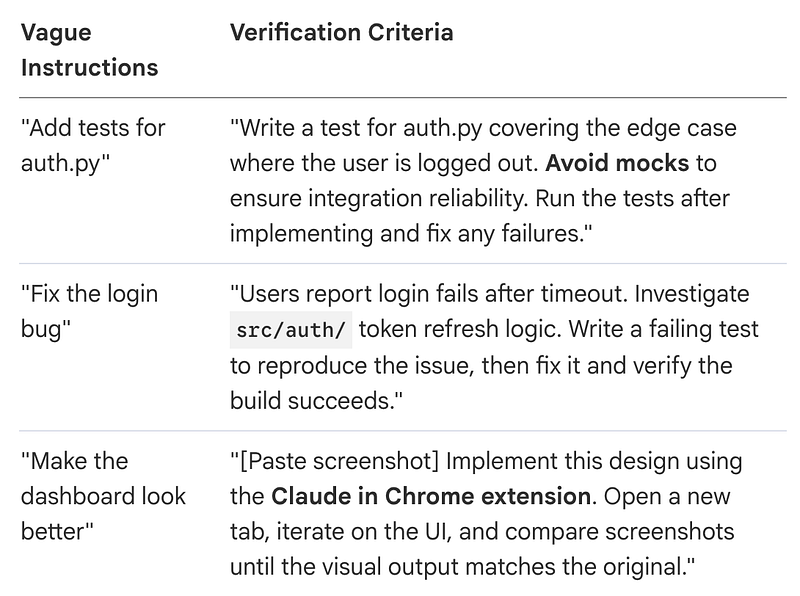
By embedding success criteria — like a specific test runner or a linter check — you reduce “attention fatigue.” Pro-level advocates use the Chrome extension for visual verification, allowing the agent to open tabs and iterate until the CSS actually works, rather than just guessing.
“Without clear success criteria, it might produce something that looks right but actually doesn’t work. You become the only feedback loop.”
3. The “Plan Mode” Protocol: Avoiding the Wrong Solution
One of the most counter-intuitive behaviors for a high-speed engineer is intentionally delaying the code phase. Letting Claude jump straight to implementation often results in code that solves the wrong problem or violates existing architectural patterns.
The sophisticated protocol follows four distinct phases:
- Explore: Use Plan Mode to let Claude read files and answer questions. It identifies dependencies and logic without touching a single byte of code.
- Plan: Ask for a detailed implementation plan. A “power move” here is using
Ctrl+Gto open the proposed plan in your text editor. This allows you to directly edit the plan—correcting architectural assumptions—before Claude proceeds.
- Implement: Switch to Normal Mode and allow Claude to execute the verified plan.
- Commit: Direct Claude to commit with a descriptive message and open a PR.
This separation is most critical when a change modifies multiple files across a complex repository, as it prevents the agent from getting “tunnel vision” on a local fix that breaks a distant dependency.
“Letting Claude jump straight to coding can produce code that solves the wrong problem.”
4. Context is Your Scarcest Resource: The Art of the “Clean Slate”
In an agentic environment, your context window is a finite, expensive resource. As a session grows, the window fills with file contents and terminal outputs. This isn’t just a cost issue; LLM reasoning performance degrades as the window fills. Claude may start “forgetting” earlier constraints or introducing subtle logic errors as token usage spikes.
To maintain “context-efficient” sessions, master these three commands:
**/clear**: Use this between unrelated tasks. Do not let the "baggage" of a refactoring session clutter a new security audit.
**/compact <instructions>**: This is a precision tool. Use/compact Focus on the API changesto summarize the history and preserve only the architectural decisions that matter, freeing up thousands of tokens for reasoning.
- Subagents for Research: Instead of letting the main agent read every file in a directory (filling your main context window), use: “Use subagents to investigate the auth flow.” Subagents explore in separate windows and report back a summary, keeping your primary implementation window clean and focused.
“The context window is the most important resource to manage… Claude may start ‘forgetting’ earlier instructions or making more mistakes.”
5. Custom Slash Commands: Building Your Own Development “Spells”
Sophisticated teams “codify repository etiquette” by packaging workflows into custom slash commands. These live as Markdown files in .claude/commands/ and can be checked into Git to standardize rituals for the entire team.
While $ARGUMENTS captures general text, the strategist uses positional arguments ($1, $2) for structured inputs. For example, a /fix-issue $1 $2 command could view a specific GitHub issue via gh, search for the bug, and implement a fix with a specific priority level.
Standardization through CLAUDE.md: The CLAUDE.md file (initialized via /init) provides persistent context that Claude can't infer from code alone. This includes repository etiquette like "always use ES modules" or "prefer single test runs." If the model ignores a rule, your CLAUDE.md is likely bloated; prune it ruthlessly to ensure adherence to core patterns.
6. Horizontal Scaling: Git Worktrees and Headless Automation
Scaling your productivity means moving from a single conversation to orchestrating multiple agents in parallel.
- Git Worktrees: This is the ultimate “power move” for tech leads. Use Git worktrees to run multiple Claude sessions in parallel on different branches. This prevents agents from interfering with the local filesystem of another task.
- Writer/Reviewer Pattern: Use two parallel sessions. Session A (Writer) implements a feature, while Session B (Reviewer) is given the output and told to find edge cases or race conditions. A fresh context in Session B ensures the reviewer isn’t biased toward the writer’s mistakes.
- Headless Mode: Use
claude -p "prompt"for CI/CD integration. For programmatic parsing, use the--output-format stream-jsonflag. This allows you to integrate Claude into pre-commit hooks or automated migration scripts across thousands of files.
7. The “Invisible” Security Backstop: Husn Canaries
As code leaves the organization via contractors or personal devices, traditional client-side proxies fail because they assume a managed perimeter. Recent IOActive research introduces Husn Canaries (pronounced /hoosn/, from the Arabic for “fortress”) as a provider-side defense.
Unlike visible markers, Husn Canaries rely on “hard-to-notice” patterns naturally embedded in your code. These include:
- Internal API endpoints and specific protocol identifiers.
- AST-based structural fingerprinting that captures function signatures rather than raw text.
- Honeypot markers that are semantically inert but trigger alerts if analyzed by participating AI providers.
If an unauthorized party analyzes a stolen repository, these patterns trigger a tamper-resistant alert back to your dashboard. Because the detection happens at the AI provider’s backend, it works even on an attacker’s personal laptop, turning the AI ecosystem into a distributed early-warning surface.
“Husn Canaries turns the AI ecosystem into a distributed early-warning surface for sensitive code.”
8. Conclusion: Developing Your Agentic Intuition
The developer workflow has evolved. The most successful tech leads won’t just be better at “prompting”; they will be master orchestrators who configure environments, ruthlessly manage token context, and deploy server-side security backstops.
As you transition from a “writer” to an “orchestrator,” pay close attention to your agent’s failure patterns. If it fails twice, /clear the context and refine the instruction. Developing this agentic intuition is what will distinguish elite engineering teams in the next decade.
One final question for your security posture: If an unauthorized party began analyzing your proprietary code with an AI tool tomorrow, would you even know?